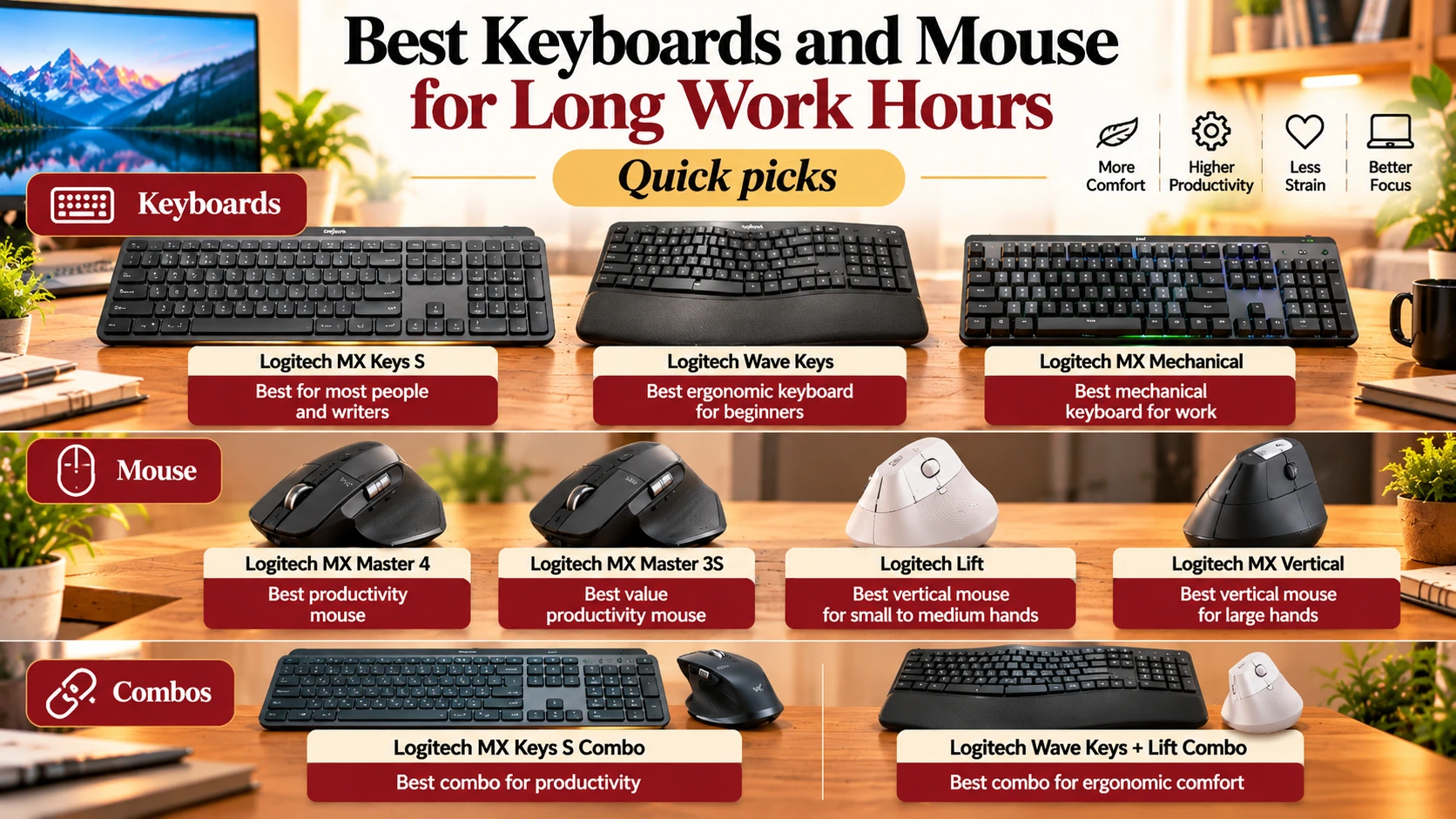
Quick picks
Keyboards
- Best for most people and writers: Logitech MX Keys S
- Best ergonomic keyboard for beginners: Logitech Wave Keys
- Best mechanical keyboard for work: Logitech MX Mechanical
Mice
- Best productivity mouse: Logitech MX Master 4
- Best value productivity mouse: Logitech MX Master 3S
- Best vertical mouse for small to medium hands: Logitech Lift
- Best vertical mouse for large hands: Logitech MX Vertical
Best combos: Logitech MX Keys S Combo (productivity) and Logitech Wave Keys + Lift Combo (ergonomic)
Disclosure: As an Amazon Associate, I earn from qualifying purchases. This costs you nothing extra.
Why your keyboard and mouse matter
If you write, code, or work at a computer for hours, you press keys and move a mouse thousands of times a day. Laptop keyboards and flat, cheap mice keep your wrists bent and forearms twisted. Over time, many people feel aches in their wrists, forearms, and shoulders.
A comfortable keyboard and mouse won’t fix everything, but they can make long workdays noticeably more pleasant and help you work faster. This guide covers the best options, with an honest look at what the research does and doesn’t show.
How we chose: We have not tested these products ourselves. Our picks draw on reviews from CNN Underscored, Engadget, RTINGS and others, plus manufacturer specifications.
Comparison table
| Product | Type | Best for | Key feature | Price tier |
| Logitech MX Keys S | Low-profile keyboard | Writers, most office work | Quiet, comfortable typing; multi-device | Mid to premium |
| Logitech Wave Keys | Ergonomic wave keyboard | Ergonomic beginners | Wave shape, cushioned palm rest | Mid |
| Logitech MX Mechanical | Mechanical keyboard | Typists who like tactile keys | Office-friendly mechanical switches | Premium |
| Logitech MX Master 4 | Sculpted productivity mouse | Power users | Haptic feedback, 8,000 DPI, fast scroll wheel | Premium |
| Logitech MX Master 3S | Sculpted productivity mouse | Value seekers | Quiet clicks, MagSpeed scroll | Mid |
| Logitech Lift | Vertical mouse (57°) | Small to medium hands; left- and right-handed versions | Handshake posture | Mid |
| Logitech MX Vertical | Vertical mouse (57°) | Large hands | Handshake posture | Mid to premium |
Check live prices on Amazon.
What research says about ergonomic mice and keyboards
Vertical mice reduce forearm twisting. With a regular flat mouse, your forearm rotates so your palm faces down (called pronation). In one study of 16 people, a vertical mouse reduced pronation from about 42° to 28° and lowered wrist-extensor muscle activity, though users needed time to get used to it before matching their usual speed. (Ergonomics, via Fundación MAPFRE)
A middle ground can work best. A US NIOSH-published study found angled “concept” mice reduced pronation compared with a flat mouse with no loss of pointing performance, while a fully vertical mouse reduced pronation the most but had the poorest pointing performance. (CDC Stacks) That suggests a sculpted mouse like the MX Master, or a moderately angled vertical mouse, may suit people who need precision.
Ergonomic gear is not a cure. A study in Applied Ergonomics found that a vertical mouse changed wrist position but did not reduce carpal tunnel pressure in people who already had carpal tunnel syndrome. (Applied Ergonomics, 2015, cited in Machová et al.) If you have ongoing pain, numbness, or tingling, see a doctor or physiotherapist.
The takeaway: ergonomic keyboards and mice can reduce awkward postures and muscle effort, and many users find them more comfortable. They work best combined with good desk setup, regular breaks, and posture changes.
How to choose
Keyboards
- Low-profile vs mechanical. Low-profile keyboards are quiet and laptop-like; mechanical keyboards offer more tactile feedback but can be louder.
- Ergonomic shape. Wave or split keyboards reduce wrist bending. Start with a gentle wave design before jumping to a fully split keyboard.
- Palm rest. A cushioned rest supports your palms during pauses, not while actively typing.
- Multi-device switching. Handy if you use a laptop, tablet, and phone.
- Layout. Decide whether you need a number pad; skipping it lets your mouse sit closer, which reduces shoulder reach.
Mouse
- Shape. Sculpted mice (like the MX Master) suit most people; vertical mice reduce forearm twisting; trackballs minimize arm movement.
- Hand size. Check size guides; a mouse that’s too big or small causes strain.
- Left-handed? The Logitech Lift comes in a left-handed version.
- Give it time. Vertical mice take a week or two to get used to.
- Buttons and scroll wheel. Extra buttons and fast scrolling speed up writing and editing.
The best keyboards
1. Logitech MX Keys S: Best for most people and writers
Engadget highlights the MX Keys S as a high-quality wireless keyboard with lots of extra features at a decent price. It offers quiet, comfortable low-profile typing and switches between multiple devices. (Engadget via Yahoo)
- Pros: excellent typing feel, multi-device, backlit
- Cons: flat design, not a dedicated ergonomic shape
2. Logitech Wave Keys: Best ergonomic keyboard for beginners
The Wave Keys has a gentle wave shape and an attached cushioned palm rest to put your hands, wrists, and forearms in a more natural typing position. Logitech says it was designed and tested against criteria set by ergonomists. It’s an easy step into ergonomics without the learning curve of a split keyboard. (Adorama product listing)
- Pros: comfortable, affordable, easy to adapt to
- Cons: wave layout takes a few days to get used to
3. Logitech MX Mechanical: Best mechanical keyboard for work
For typists who love tactile feedback, the MX Mechanical brings mechanical switches in a restrained, office-friendly design. (MacMyths)
- Pros: satisfying typing feel, multi-device
- Cons: louder than low-profile keyboards
The best mouse
1. Logitech MX Master 4: Best productivity mouse
Logitech’s newest flagship adds built-in haptic feedback to the MX Master line, along with an 8,000 DPI sensor and MagSpeed scroll wheel. The older MX Master 3S is still on sale at a lower price. (Computing for Geeks)
- Pros: comfortable sculpted shape, superb scroll wheel, customizable buttons
- Cons: premium price; right-handed only
2. Logitech MX Master 3S: Best value productivity mouse
The MX Master 3S offers most of what makes the MX Master 4 great, including quiet clicks and the fast MagSpeed wheel, for less money. It’s also the mouse included in the MX Keys S Combo. (GeekChamp)
- Pros: proven design, lower price
- Cons: no haptic feedback
3. Logitech Lift: Best vertical mouse for small to medium hands
CNN Underscored calls the Lift the best vertical mouse it tested, especially for people with wrist, arm, or shoulder problems. It’s cheaper and more compact than the MX Vertical and comes in left- and right-handed versions. Its 57° angle puts your hand in a handshake position. (CNN Underscored; Computing for Geeks)
- Pros: reduces forearm twisting, comfortable, left-handed option
- Cons: takes time to adjust; less precise for detailed design work
4. Logitech MX Vertical: Best vertical mouse for large hands
The MX Vertical uses the same 57° handshake angle as the Lift in a larger shell, suiting bigger hands.
- Pros: comfortable for large hands
- Cons: pricier than the Lift; right-handed only
The best combos
- Logitech MX Keys S Combo: MX Keys S keyboard, MX Master 3S mouse, and a palm rest, widely named the best all-round productivity combo. (GeekChamp)
- Logitech Wave Keys + Lift Combo: an ergonomic pairing of the wave keyboard and vertical mouse in one box.
For readers in India
Logitech’s MX, Wave Keys, and Lift products are sold in India; check for an official Indian warranty. On a tighter budget, Logitech’s lower-priced keyboard and mouse combos are a big upgrade over a laptop keyboard and trackpad, especially when paired with a laptop stand.
FAQs
Is a vertical mouse better for your wrist?
Research shows vertical mice reduce forearm twisting and some muscle activity. They aren’t a cure for existing conditions like carpal tunnel syndrome, so see a professional if you have ongoing pain.
How long does it take to get used to a vertical mouse?
Usually a week or two. Studies note users need some familiarization time before matching their usual speed.
What’s the best keyboard for writers?
The Logitech MX Keys S is a favorite for quiet, comfortable typing. For ergonomics, try the Wave Keys.
MX Master 4 or MX Master 3S?
The MX Master 4 adds haptic feedback and refinements. The 3S offers most of the same experience for less money.
Do I need a wrist rest?
A palm rest helps during pauses. Avoid pressing your wrists down hard while actively typing.
Are these keyboards and mice compatible with Mac?
Yes. Logitech’s MX range works with macOS and Windows, and Mac-specific versions are available.
What else helps with wrist and shoulder strain?
Keep your keyboard and mouse close and at elbow height, raise your screen to eye level, and take regular short breaks to stretch and move.
Final verdict
For most writers and remote workers, the Logitech MX Keys S Combo (with the MX Master 3S) is the best all-round setup. If you want more ergonomic support, the Wave Keys + Lift Combo is an easy, affordable step. Power users can upgrade to the MX Master 4, and anyone with large hands who wants a vertical mouse should look at the MX Vertical.
Comfortable tools, a good desk setup, and regular breaks make long workdays easier on your body.
Disclosure: As an Amazon Associate, I earn from qualifying purchases. Product details were checked in October 2026 and may change.
References
- Vertical vs standard mouse biomechanics study, Ergonomics (record via Fundación MAPFRE). fundacionmapfre.org
- NIOSH-published study of angled concept mice vs flat and vertical mice. CDC Stacks
- Machová B, et al. (2022). Comparison of upper extremity muscle activity when working with a classic and vertical computer mouse. Occupational Medicine. prolekare.cz
- CNN Underscored. Best ergonomic mouse. cnn.com
- Engadget (via Yahoo). Best keyboards. yahoo.com
- Computing for Geeks. Best mouse and keyboard for programming. computingforgeeks.com
- GeekChamp. Best keyboard and mouse combos for 2026. geekchamp.com