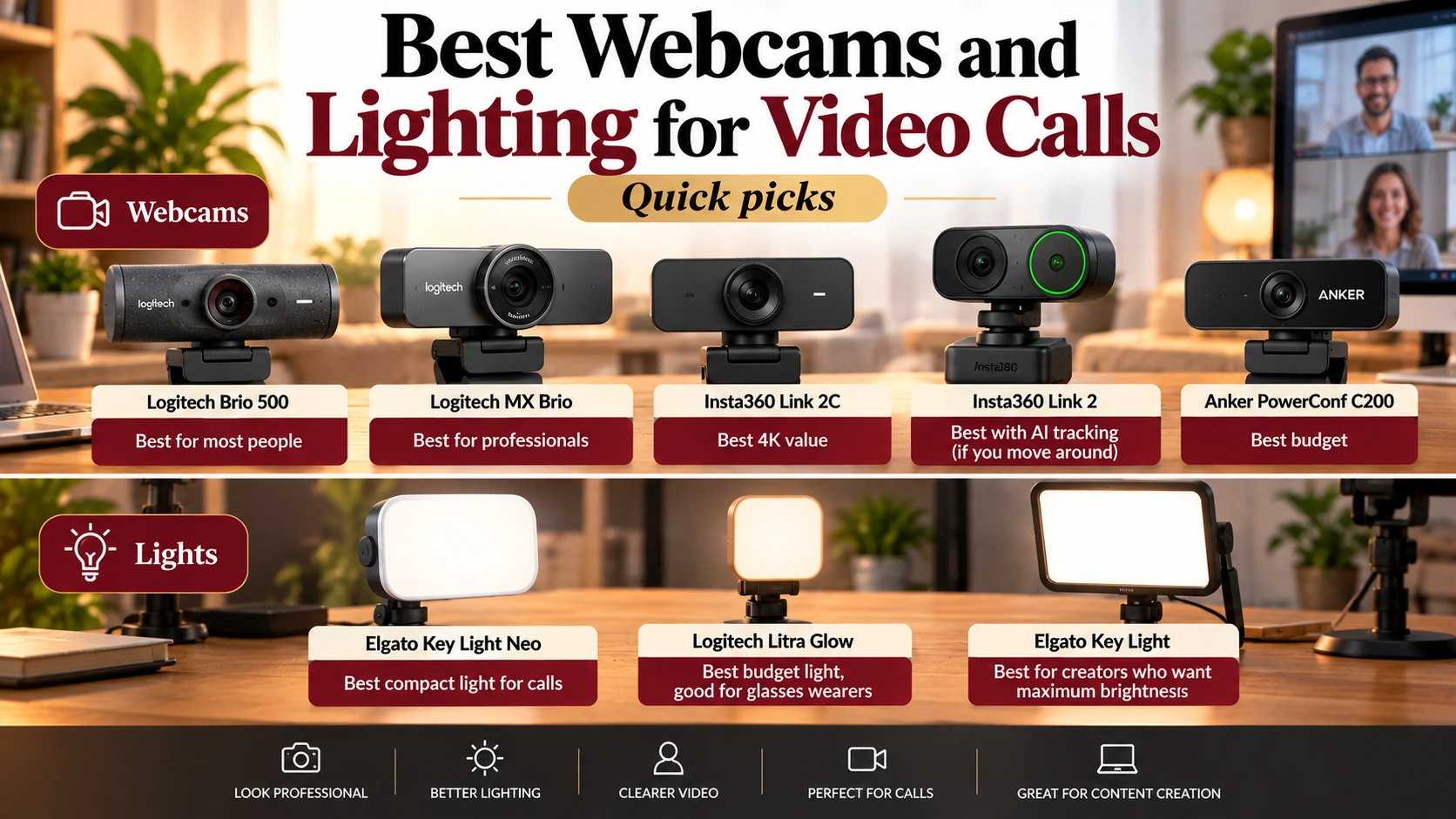
Quick picks
Webcams
- Best for most people: Logitech Brio 500
- Best for professionals: Logitech MX Brio
- Best 4K value: Insta360 Link 2C
- Best with AI tracking (if you move around): Insta360 Link 2
- Best budget: Anker PowerConf C200
Lights
- Best compact light for calls: Elgato Key Light Neo
- Best budget light, good for glasses wearers: Logitech Litra Glow
- Best for creators who want maximum brightness: Elgato Key Light
Disclosure: As an Amazon Associate, I earn from qualifying purchases. This costs you nothing extra.
Why upgrade your video call setup?
Your laptop’s built-in webcam often makes you look grainy, dim, and shot from below. On calls with clients, interviewers, or your team, that first impression matters.
Here’s the secret most people miss: lighting usually matters more than the camera. A decent webcam with good light beats an expensive webcam in a dark room. This guide covers both, plus simple, research-backed tips on camera angle and background.
How we chose: We have not tested these products ourselves. Our picks draw on reviews from Tom’s Hardware, TechRadar, Engadget, and other publications, along with manufacturer specifications.
Comparison table
| Product | Type | Resolution / output | Best for | Price tier |
| Logitech Brio 500 | Webcam | 1080p, auto light correction, privacy shutter | Most remote workers | Mid |
| Logitech MX Brio | Webcam | 4K/30fps, 1080p/60fps | Professionals, presentations | Premium |
| Insta360 Link 2C | Webcam | 4K | Sharp image at a good price | Mid |
| Insta360 Link 2 | Webcam with AI gimbal tracking | 4K | Teachers, presenters who move | Premium |
| Anker PowerConf C200 | Webcam | 2K, adjustable field of view | Budget upgrade | Budget |
| Elgato Key Light Neo | Light | Up to 1,000 lumens, USB-C, monitor mount | Daily video calls | Budget to mid |
| Logitech Litra Glow | Light | Wide soft panel, USB, monitor mount | Small desks, glasses wearers | Budget |
| Elgato Key Light | Light | 2,800 lumens, desk clamp, Wi-Fi app | Streamers, creators | Premium |
What research says about looking good on video calls
Raise the camera to eye level or slightly above. Researcher Géraldine Fauville, who co-authored a Stanford study on impressions in video meetings, says a camera slightly above eye level increases how attractive and less threatening people seem, and that looking at the camera mimics eye contact and makes you seem more likeable. (Qantas Travel Insider interview) Laptop cameras usually look up at you, which is the opposite.
Your background matters. A Durham University study published in PLOS One showed 167 people images of faces on simulated video calls. Faces in front of bookcases or plants were rated the most trustworthy and competent, while living-room and novelty backgrounds scored lowest. Smiling helped regardless of the background. The study used still images, so real calls may differ. (CNN via WRAL; Science Focus)
Glitches cost you trust. A 2025 study published in Nature found that brief video freezes and lags made viewers less willing to work with a salesperson and less likely to trust health advice; in one experiment, 61% trusted a health worker after a glitchy call versus 77% after a smooth one. (NPR via Connecticut Public; NPR Illinois) A reliable internet connection matters as much as your camera; see our Wi-Fi router guide. (Update link once published.)
Why lighting beats camera upgrades
Webcams have small sensors, so in dim rooms they boost brightness digitally, which creates grain and blur. Adding a soft light in front of you gives the camera more to work with, so even an inexpensive webcam produces a cleaner, sharper image.
How to choose a webcam and light
Webcam
- Resolution. 1080p is plenty for most calls, since Zoom, Meet, and Teams usually compress video anyway. 4K helps if you record videos or want to crop and zoom.
- Low-light performance and auto exposure. Look for features that balance light automatically, especially if you sit near a window.
- Field of view. 65–80° frames one person well; wider views show more of your room.
- Privacy shutter. A physical cover gives peace of mind.
- AI tracking. Only worth paying for if you move around, stand at a whiteboard, or teach.
- Mounting. Make sure it clips securely to your monitor or laptop.
Lighting
- Key light vs ring light. Ring lights are cheap but can reflect as circles in glasses. Panel-style key lights give softer, more natural light.
- Adjustable brightness and color temperature let you match daylight or warm room lighting.
- Placement. Light should come from in front of you, slightly above eye level and a little to one side. Avoid sitting with a bright window behind you.
- Power. USB-powered lights plug straight into your laptop or monitor.
The best webcams in 2026
1. Logitech Brio 500: Best for most people
The Brio 500 is repeatedly named the best webcam for most people, with reviewers praising its automatic light correction, adjustable framing, dual microphones, and privacy shutter. (Knowledge Library, summarizing Tom’s Hardware and Engadget)
- Pros: reliable image in mixed lighting, privacy shutter, easy setup
- Cons: 1080p only
2. Logitech MX Brio: Best for professionals
TechRadar picks the MX Brio as its best webcam for professional use. It records 4K at 30fps or 1080p at 60fps for a crisp, polished look in meetings and presentations. (TechRadar)
- Pros: excellent image quality, premium build
- Cons: costs more than most people need for calls
3. Insta360 Link 2C: Best 4K value
TechRadar names the Link 2C its best 4K webcam, a compact model that brings 4K quality at a lower price than many rivals. (TechRadar; Airtime)
- Pros: sharp 4K image, compact
- Cons: no motorized tracking (unlike the Link 2)
4. Insta360 Link 2: Best with AI tracking
The Link 2 sits on a small motorized gimbal that follows you as you move. Reviewers note AI tracking is only worth paying for if you actually stand up, move around, or use a whiteboard. (The Gadgeteer)
- Pros: follows you automatically, 4K image
- Cons: tracking can be overkill for seated calls
5. Anker PowerConf C200: Best budget
A popular budget choice offering 2K resolution, adjustable field of view, and noise-cancelling microphones at a low price. (Knowledge Library)
- Pros: big upgrade over most laptop cameras for little money
- Cons: weaker in low light than premium models
The best lights for video calls
1. Elgato Key Light Neo: Best compact light for calls
A small edge-lit panel (up to about 1,000 lumens) that mounts on your monitor and powers over USB-C. Its edge-lit design is aimed at reducing glare, which makes it comfortable for long call days. (Best Buy; Of Zen and Computing)
- Pros: compact, soft light, easy monitor mount
- Cons: less powerful than full-size studio lights
2. Logitech Litra Glow: Best budget light, good for glasses wearers
The Litra Glow is a USB-powered panel with a wide, frameless diffuser and a monitor mount. Reviewers note its wide panel avoids the circular reflections ring lights leave in glasses. (Of Zen and Computing)
- Pros: affordable, natural-looking light, simple controls
- Cons: lower output than larger lights
3. Elgato Key Light: Best for creators
The full-size Key Light offers 2,800 lumens, a color temperature range of 2,900–7,000K, a desk clamp, and Wi-Fi app control, making it a favorite of streamers and YouTubers. (Finding Dulcinea)
- Pros: very bright, adjustable, professional results
- Cons: pricier; needs desk space and Wi-Fi for app control
For readers in India
Logitech, Insta360, Anker, and Elgato products are available in India; check for an Indian warranty. Budget brands also sell affordable USB panel lights. Before buying anything, try the free fixes: face a window during the day, raise your laptop on books or a stand, and tidy the background (a bookshelf or plant helps).
FAQs
Is a 4K webcam worth it for Zoom calls?
Usually not. Video apps compress the picture, so a good 1080p webcam with decent lighting looks nearly as good. 4K is useful for recording videos or cropping in.
Ring light or key light?
Key lights give softer, more natural light and avoid circular reflections in glasses. Ring lights are cheaper and fine if you don’t wear glasses.
Where should I place my light?
In front of you, slightly above eye level, and a little to one side. Avoid a bright window behind you.
What is the best camera height for video calls?
At eye level or slightly above, so the camera isn’t looking up at you.
What background looks most professional?
In a Durham University study, bookshelves and plants rated highest for trust and competence; cluttered living spaces and novelty backgrounds rated lowest.
Can I use my phone as a webcam?
Yes. Many phones work as webcams with built-in features or apps, and their cameras are often better than laptop webcams.
Why does my video freeze on calls?
Usually your internet connection. A wired connection or a better router can help, and smoother calls make you seem more trustworthy.
Final verdict
For most remote workers, the Logitech Brio 500 plus an Elgato Key Light Neo or Logitech Litra Glow is the sweet-spot setup. Professionals can step up to the Logitech MX Brio, and anyone who moves around while presenting should look at the Insta360 Link 2.
Then apply the free fixes: camera at eye level, light in front of you, and a tidy background with books or plants.
Disclosure: As an Amazon Associate, I earn from qualifying purchases. Product details were checked in October 2026 and may change.
References
- Fauville G. Interview on gaze, camera angle and backgrounds in video meetings. Qantas Travel Insider. qantas.com
- Durham University video call background study, PLOS One (reported by CNN). wral.com; sciencefocus.com
- Brucks M, Rifkin J, et al. (2025). Video call glitches and trust, Nature (reported by NPR). ctpublic.org
- TechRadar. Best webcams 2026. techradar.com
- Knowledge Library. Best webcams for remote work 2026. knowledgelib.io
- The Gadgeteer. Best webcams for working from home. the-gadgeteer.com
- Of Zen and Computing. Best key lights for video calls. ofzenandcomputing.com