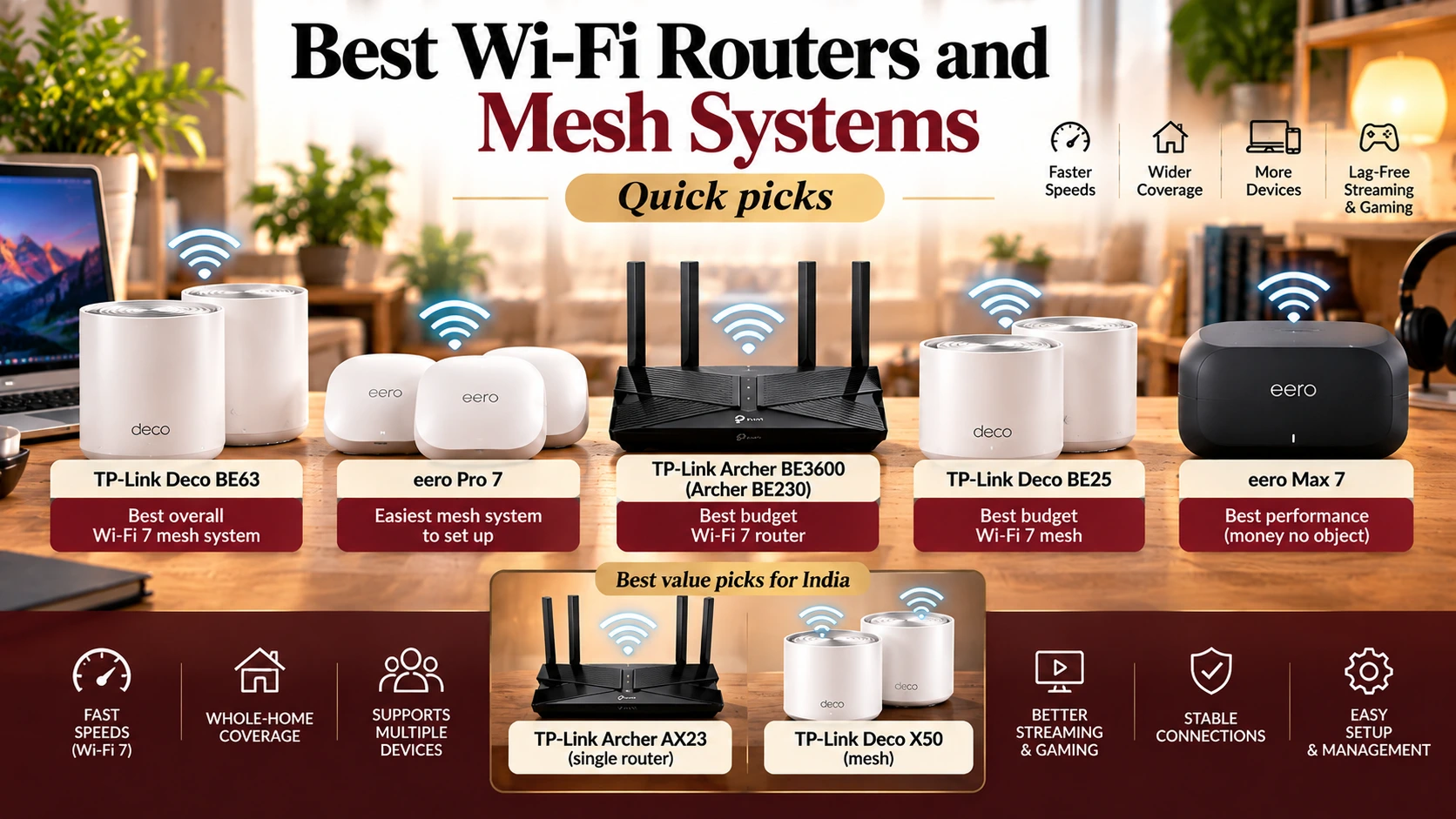
Quick picks
- Best overall Wi-Fi 7 mesh system: TP-Link Deco BE63
- Easiest mesh system to set up: eero Pro 7
- Best budget Wi-Fi 7 router: TP-Link Archer BE3600 (Archer BE230)
- Best budget Wi-Fi 7 mesh: TP-Link Deco BE25
- Best performance (money no object): eero Max 7
- Best value picks for India: TP-Link Archer AX23 (single router) and TP-Link Deco X50 (mesh)
Disclosure: As an Amazon Associate, I earn from qualifying purchases. This costs you nothing extra.
Why your router matters more than your internet plan
You can pay for a 300 Mbps or 1 Gbps fiber plan and still get buffering, dropped video calls, and dead zones in the bedroom. Often, the problem isn’t your internet provider; it’s the free router they gave you.
A good router or mesh system spreads a strong, stable signal across your whole home. That matters more than ever: research published in Nature in 2025 found that brief video-call glitches make people seem less trustworthy in sales pitches, job interviews, and health consultations. (NPR via Connecticut Public)
How we chose: We have not tested these routers ourselves. Our picks draw on lab testing from RTINGS and reviews from Tom’s Guide and TechRadar, plus manufacturer specifications.
Comparison table
| Router | Type | Wi-Fi standard | Best for | Price tier |
| TP-Link Deco BE63 | Tri-band mesh | Wi-Fi 7 (2.4/5/6 GHz) | Most homes needing whole-house coverage | Mid |
| eero Pro 7 | Tri-band mesh | Wi-Fi 7 | Easy setup, less tech-savvy users | Premium |
| TP-Link Archer BE3600 (BE230) | Single dual-band router | Wi-Fi 7 (2.4/5 GHz) | Apartments, budget upgrade | Budget |
| TP-Link Deco BE25 | Dual-band mesh | Wi-Fi 7 | Budget whole-home mesh | Budget to mid |
| eero Max 7 | Tri-band mesh | Wi-Fi 7, 10Gbps Ethernet | Large homes, multi-gig internet | Premium |
| TP-Link Archer AX23 | Single dual-band router | Wi-Fi 6 | India: small to medium homes | Budget |
| TP-Link Deco X50 | Dual-band mesh | Wi-Fi 6 | India: larger homes, multiple floors | Mid |
Check live prices on Amazon.
Wi-Fi 6, 6E, and 7 explained
| Standard | Bands | What it adds |
| Wi-Fi 6 (802.11ax) | 2.4 and 5 GHz | Better performance with many connected devices |
| Wi-Fi 6E | Adds 6 GHz | A new, less crowded band for faster, cleaner connections |
| Wi-Fi 7 (802.11be) | 2.4, 5, and 6 GHz | Wider 320 MHz channels in the 6 GHz band, Multi-Link Operation (MLO), higher peak speeds |
Multi-Link Operation is Wi-Fi 7’s flagship feature: devices can connect over several bands at once, which improves both speed and reliability. Wi-Fi 7 also doubles the maximum channel width from 160 MHz to 320 MHz in the 6 GHz band, and it works with older devices. (everything RF; HPE)
The catch: to benefit from Wi-Fi 7’s biggest features, your phone or laptop also needs Wi-Fi 7. Older devices still connect, just at their own speeds.
Big news for India: the 6 GHz band is now open
In January 2026, India’s Department of Telecommunications delicensed the lower 6 GHz band (5925–6425 MHz) for low-power indoor and very-low-power Wi-Fi use, enabling Wi-Fi 6E and Wi-Fi 7 in Indian homes. (Business Standard; Communications Today) The upper part of the band (6425–7125 MHz) remains reserved, so Indian users get 500 MHz of 6 GHz spectrum compared with 1,200 MHz in the US. (ABI Research)
What this means for you: Wi-Fi 6E and 7 routers now make sense in India, but check that the model sold on Amazon.in has the 6 GHz band enabled for India.
Single router or mesh?
- Single router: fine for apartments and smaller homes where the router can sit centrally.
- Mesh system: two or more units that work together as one network. Best for larger homes, multiple floors, or thick concrete walls (common in Indian homes) that block signals.
How to choose a router or mesh system
- Match your internet plan. A router much faster than your plan won’t speed up your internet, but one slower than your plan will hold it back. For 300 Mbps–1 Gbps plans, a good Wi-Fi 6 or entry-level Wi-Fi 7 router is plenty.
- Home size and layout. One router for apartments; mesh for larger homes, multiple floors, or thick walls.
- Ports. Gigabit ports at minimum; 2.5 Gbps ports if your plan exceeds 1 Gbps.
- Your devices. Wi-Fi 7’s advanced features need Wi-Fi 7 devices. If most of your devices are older, a Wi-Fi 6 router may be the better value.
- Ethernet backhaul. If you can run cables between mesh units, performance improves greatly.
- Security and parental controls. Check what’s free and what needs a subscription.
- India: check ISP compatibility. Indian fiber providers use different connection types (PPPoE, DHCP/IPoE). Confirm your router supports the one your provider uses, or keep the ISP’s router in bridge mode.
- India: power cuts. Pair your router with a mini UPS so Wi-Fi stays up during outages.
The best Wi-Fi routers and mesh systems in 2026
1. TP-Link Deco BE63: Best overall Wi-Fi 7 mesh
TechRadar names the Deco BE63 the best Wi-Fi router and best mesh system of 2026, and Tom’s Guide calls it its Wi-Fi 7 mesh recommendation for most users, noting multi-gig performance without breaking the bank and support for wired and wireless backhaul at the same time. (TechRadar; Tom’s Guide)
- Pros: fast tri-band Wi-Fi 7, strong coverage, good value for a tri-band system
- Cons: no 10 Gbps port
2. eero Pro 7: Easiest mesh system to set up
Tom’s Guide praises the eero Pro 7 as an incredibly easy-to-use Wi-Fi 7 mesh system with excellent reliability, especially good for less tech-savvy households. (Tom’s Guide)
- Pros: very simple app setup, reliable roaming
- Cons: premium price; some advanced features require a subscription
3. TP-Link Archer BE3600 (Archer BE230): Best budget Wi-Fi 7 router
Tom’s Guide says the Archer BE3600 is easy to recommend for anyone who wants the latest Wi-Fi standard without paying for the fastest, most premium router. It’s a dual-band (2.4 and 5 GHz) router, so it skips the 6 GHz band. (Tom’s Guide)
- Pros: affordable Wi-Fi 7, 2.5 Gbps ports
- Cons: no 6 GHz band; single unit covers smaller homes
4. TP-Link Deco BE25: Best budget Wi-Fi 7 mesh
RTINGS recommends the Deco BE25 as a budget Wi-Fi 7 mesh option, noting it performs about the same as the Archer BE230 while being much smaller and easier to place. (RTINGS)
- Pros: affordable whole-home coverage, compact units
- Cons: dual-band only
5. eero Max 7: Best performance
RTINGS calls the eero Max 7 the best-performing Wi-Fi 7 router it has tested. It’s a tri-band mesh system with 10 Gbps Ethernet, built for large homes and multi-gig internet plans. (RTINGS; GeekChamp)
- Pros: top-tier speed and coverage
- Cons: very expensive; overkill for most plans
Best picks for India
Most Indian fiber plans run between 100 Mbps and 1 Gbps, so a good Wi-Fi 6 router is still excellent value:
- TP-Link Archer AX23 (Wi-Fi 6, single router): a popular mid-range choice for small to medium homes, with support for the connection types used by JioFiber, Airtel Xstream, and ACT Fibernet. (Reviehub) https://link.amazon/B09CEGnn2
- TP-Link Deco X50 (Wi-Fi 6 mesh): a good fit for larger 3+ BHK homes and multiple floors. (Reviehub) https://link.amazon/B00PJoxF1
- TP-Link Archer BE230 Dual-Band BE3600 Wi-Fi 7 in India: now that the lower 6 GHz band is open, TP-Link Archer and Deco Wi-Fi 7 models are worth considering if you have Wi-Fi 7 devices and a fast plan. Check the Indian listing for 6 GHz support.
Check before buying: some ISP-branded routers support only certain connection types, so confirm compatibility with your provider. Look for an official Indian warranty.
FAQs
Do I need a Wi-Fi 7 router in 2026?
Not necessarily. If your devices are older or your plan is under 1 Gbps, a good Wi-Fi 6 router delivers most of the benefit. Wi-Fi 7 makes sense if you have Wi-Fi 7 devices or want to future-proof.
Is Wi-Fi 6E and Wi-Fi 7 allowed in India?
Yes. India delicensed the lower 6 GHz band (5925–6425 MHz) for indoor Wi-Fi in January 2026. Check that the router sold in India has the 6 GHz band enabled.
Mesh or a single router?
A single router works for apartments. Choose mesh for larger homes, multiple floors, or thick concrete walls.
Will a new router increase my internet speed?
It won’t exceed your plan’s speed, but it can help you actually get that speed throughout your home, especially if your current router is old or the ISP’s basic model.
Can I use my own router with JioFiber or Airtel?
Usually yes, but check that the router supports your provider’s connection type, or set the ISP’s router to bridge mode.
Where should I place my router?
Centrally, up high, and in the open, not inside a cabinet or behind the TV.
How do I keep Wi-Fi on during power cuts?
Use a small router UPS.
Final verdict
For most homes, the TP-Link Deco BE63 is the best all-round Wi-Fi 7 mesh system. Choose the eero Pro 7 if you want the easiest setup, or the Archer BE3600 or Deco BE25 to upgrade on a budget. In India, the Archer AX23 and Deco X50 remain excellent value for typical fiber plans, and Wi-Fi 7 is now a real option thanks to the newly opened 6 GHz band.
Disclosure: As an Amazon Associate, I earn from qualifying purchases. Product details were checked in October 2026 and may change.
References
- RTINGS. The best Wi-Fi 7 routers. rtings.com
- Tom’s Guide. Best Wi-Fi routers of 2026. tomsguide.com
- Tom’s Guide. Best Wi-Fi 7 routers of 2026. tomsguide.com
- TechRadar. The best Wi-Fi routers in 2026. techradar.com
- Business Standard. (2026). DoT de-licenses lower 6 GHz band. business-standard.com
- ABI Research. India releases the lower 6 GHz band for unlicensed use. abiresearch.com
- everything RF. What is Wi-Fi 7? everythingrf.com
- NPR. Your glitchy video calls may make people mistrust you. ctpublic.org
- Reviehub. Best Wi-Fi 6 routers in India 2026. reviehub.in